Getting started
Overview
This guide helps you use the Partner API to manage partner administrators and roles they can be assigned.
Pre-requisites
You must be enrolled in the Sophos Partner Program to call our Partner APIs.
You must go through the Getting Started guide for Sophos Partners. This helps you set up your API credentials.
The instructions in this guide assume you have authenticated using API credentials and obtained a valid JWT token ({jwt}). You should also have the UUID of the partner account that you can pass to each API call ({partnerId}). This is returned by the Who-am-I API.
Terminology
Before you use this API, here are a few terms you should know:
- Principal: A user or service associated with a single Sophos Fusion account that requires access to resources in that account.
- Administrator: A user principal with a system-wide unique identity (email address).
- API credentials: A service principal with a system-wide unique identity (Client ID)
- Permission set: A cohesive set of operations that a principal can perform.
- Role: A collection of permission sets. Roles may be predefined by Sophos or custom.
- Scope: A set of accounts that contain the resources to which a principal is given access.
- Role assignment: The assignment of role to a principal within an associated scope. A principal has zero or more role assignments.
Let's explore these terms through an example. Assume the MSP Acme Corp has two Sophos Fusion administrators, Joe Bloggs and Jane Doe, and that the MSP manages three tenants: A, B, and C.
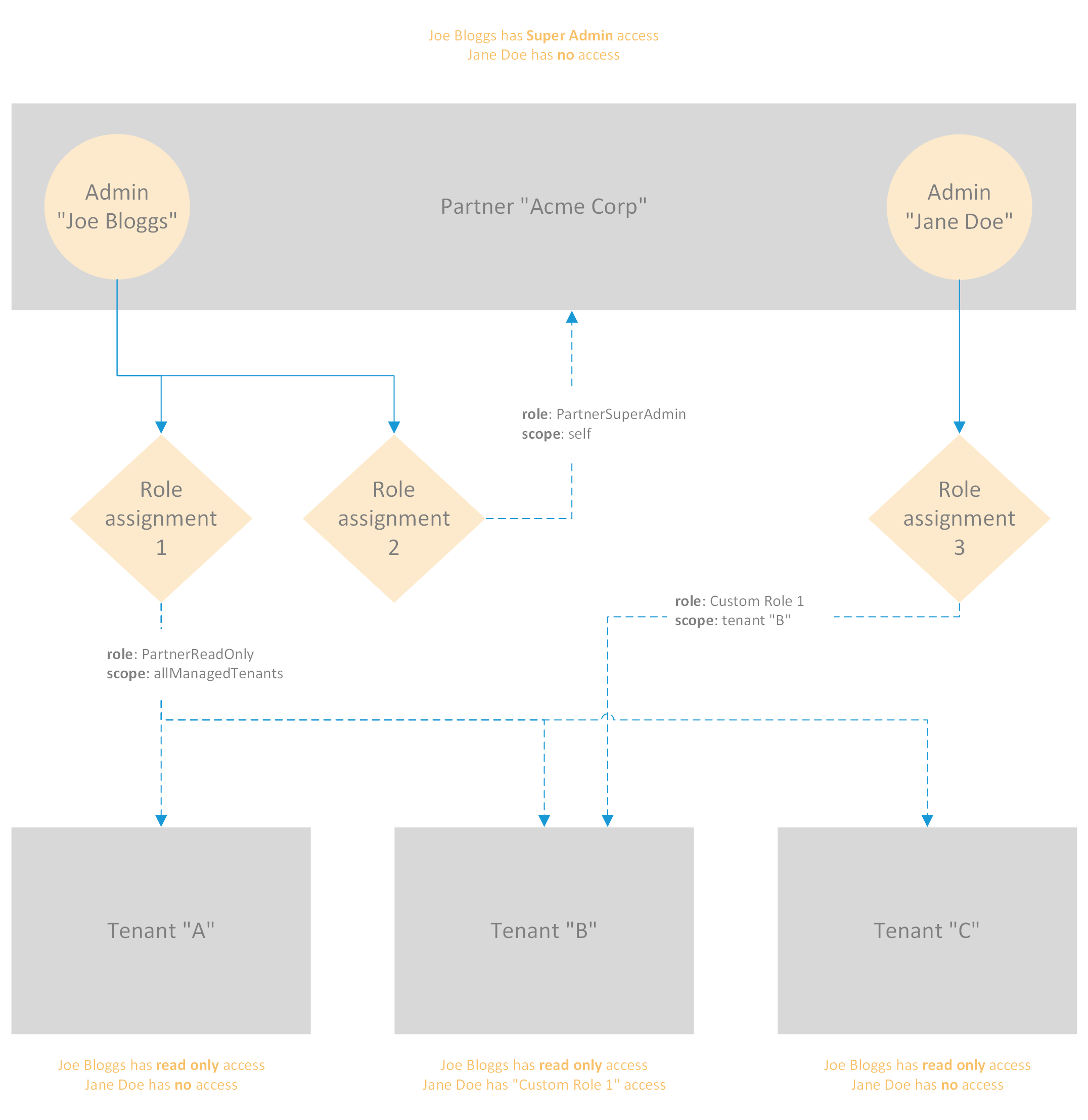
In the figure above, Joe has two assignments:
- The first, for the predefined role
PartnerReadOnlywith a dynamic scope that includes all current and future tenants managed by Acme Corp (allManagedTenants). - The second, for the predefined role
PartnerSuperAdminwith the scope limited to the Acme Corp. partner account (self)
Jane has a single custom role, Custom Role 1, assigned to manage only Tenant B.
With these assignments, Jane doesn't have access to the Partner Admin console for Acme Corp, but does have some permissions through Custom Role 1 to access Customer Admin on behalf of Tenant B. However, she has no access to the Customer Admin console for tenants A and C.
Joe can login to Partner Admin and manage the Acme Corp account. He can also login to Customer Admin on behalf of each of the tenants, but will only be presented with a read-only view.
Note that role assignments only confer privileges, never take them away. Therefore the resultant of multiple role assignment is always additive.
API operations
You can perform the following operations using the Partner API:
| Operation | HTTP Method | Path |
|---|---|---|
| List permission sets | GET | /partner/v1/roles/permission-sets |
| List all partner roles | GET | /partner/v1/roles |
| Create a new partner role | POST | /partner/v1/roles |
| Get a partner role by ID | GET | /partner/v1/roles/{roleId} |
| Update an existing partner role | PATCH | /partner/v1/roles/{roleId} |
| Delete a partner role by ID | DELETE | /partner/v1/roles/{roleId} |
| List all partner administrators | GET | /partner/v1/admins |
| Create a new partner administrator | POST | /partner/v1/admins |
| Get a partner administrator by ID | GET | /partner/v1/admins/{adminId} |
| Delete a partner administrator | DELETE | /partner/v1/admins/{adminId} |
| Assign a role to a partner administrator | POST | /partner/v1/admins/{adminId}/role-assignments |
| Get the list of role assignments for an administrator | GET | /partner/v1/admins/{adminId}/role-assignments |
| Get partner administrator role assignment by ID | GET | /partner/v1/admins/{adminId}/role-assignments/{assignmentId} |
| Remove a role assignment from a partner administrator | DELETE | /partner/v1/admins/{adminId}/role-assignments/{assignmentId} |
Note: The base URL for all the API calls above is https://api.central.sophos.com.
List permission sets
Call this API to get a list of permission sets:
GET /partner/v1/roles/permission-sets
Authorization: Bearer {jwt}
X-Partner-ID: {partnerId}
The response looks like this:
{
    "items": [
        {
            "id": "tenant_role_management",
            "name": "Tenant Role Management",
            "description": "Provides management access for tenant roles",
            "type": "setting",
            "access": "admin",
            "principalTypes": [
                "service"
            ],
            "allowedInCustomRoles": true
        },
        {
            "id": "logs_reports_readonly",
            "name": "Logs Reports Readonly",
            "description": "Provides read-only access for logs & reports",
            "type": "setting",
            "principalTypes": [
                "user",
                "service"
            ],
            "allowedInCustomRoles": true
        },
        // Other permission sets
    ]
}
You will need the id values of permission sets to be able to create custom roles.
List all partner roles
To fetch a list of roles, call:
GET /partner/v1/roles
Authorization: Bearer {jwt}
X-Partner-ID: {partnerId}
This returns a response like:
{
    "items": [
        {
            "id": "70617274-6e65-7273-7570-657261646d69",   // Role ID
            "name": "PartnerSuperAdmin",
            "description": "Partner SuperAdmin",
            "type": "predefined",               // May be 'predefined' or 'custom'
            "principalType": "user",            // May be 'user' or 'service'
            "permissionSets": [
                "wireless_product_admin",       // Permission set ID
                "policy_mgmt_admin",
                "optix_product_management",
                "phish_threat_product_admin",
                // ... other permission sets
            ]
        },
        {
            "id": "70617274-6e65-7268-656c-706465736b5b",
            "name": "PartnerHelpDesk",
            "description": "Partner HelpDesk",
            "type": "predefined",
            "principalType": "user",
            "permissionSets": [
                "wireless_product_helpdesk",
                "policy_mgmt_readonly",
                "optix_product_helpdesk",
                "phish_threat_product_helpdesk",
                // ... other permission sets
            ]
        },
        // ... other role objects
    ]
}
Create a new partner role
To create a new custom role:
POST /partner/v1/roles
Authorization: Bearer {jwt}
X-Partner-ID: {partnerId}
Send a JSON request body shaped like this:
{
    "name": "My custom role",       // Required; role name must be unique
    "permissionSets": [             // Required; at least one permission
        "wireless_product_helpdesk" //   set must be given
    ],
    "principalType": "user",        // Required
    "description": "WiFi helpdesk role"
}
The response looks like:
{
    "id": "67f37457-757e-41b7-8cd1-94336a109262",
    "name": "My custom role",
    "description": "Gives helpdesk access only to WiFi management functionality",
    "type": "custom",
    "principalType": "user",
    "permissionSets": [
        "wireless_product_helpdesk"
    ],
    "createdAt": "2021-08-08T06:21:44.750Z",
    "updatedAt": "2021-08-08T06:21:44.750Z"
}
Now this role shows up in the response to the API call to list roles. Note the type is set to custom.
Get a partner role by ID
When you know the role ID, get the role object by calling:
GET /partner/v1/roles/{roleId}
Authorization: Bearer {jwt}
X-Partner-ID: {partnerId}
The response is a role object with the same attributes as an item in the response returned by the List roles API operation.
Update an existing partner role
To modify an existing custom role:
PATCH /partner/v1/roles/{roleId}
Authorization: Bearer {jwt}
X-Partner-ID: {partnerId}
Pass the role ID in place of {roleId}
Send a request body that looks like this:
{
    "name": "Custom Role 2",                     // Updated name; must be unique
    "description": "My custom role description", // Updated description
    "permissionSets": [                          // Updated permission set
        "optix_product_management",              //   (replaces existing ones)
        "phish_threat_product_admin",
        // ... other permission sets
    ]
}
All fields are optional. Some permission sets are restricted from use in custom roles. These have the field allowedInCustomRole set to false (see List permission sets).
The response is a role object.
Delete a partner role by ID
Delete a custom role by calling:
GET /partner/v1/roles/{{roleId}}
Authorization: Bearer {jwt}
X-Partner-ID: {partnerId}
The response indicates if the role was deleted. Note that a role in use cannot be deleted.
List all partner administrators
To list administrators in the partner account, call the API:
GET /partner/v1/admins
Authorization: Bearer {jwt}
X-Partner-ID: {partnerId}
The response is paged and looks like this:
{
    "items": [   // Array of administrator objects
        {
            "username": "joe.bloggs@example.com",
            "profile": { ... },
            "roleAssignments": [ ... ]
        },
        {
            "name": "jsmith@example.com",
            "profile": { ... },
            "roleAssignments": [ ... ]
        }
        // ...other administrators
    ],
    "pages": {
        "current": 1,
        "size": 50,
        "maxSize": 100
    }
}
You can set the page size using pageSize=50. Use page=2 to fetch the second page. Pass the query param pageTotal=true to get number of administrators across all the pages in the pagination metadata in the response.
Create a new partner administrator
To create a new administrator, call the API:
POST /partner/v1/admins
Authorization: Bearer {jwt}
X-Partner-ID: {partnerId}
Pass the request body:
{
    "username": "joe.bloggs@example.com",   // Required; must be unique
    "profile": {                            // Required
        "name": "Joe Bloggs",               // Required
        "firstName": "Joe",                 // Required
        "lastName": "Bloggs",               // Required
        "phone": "12312341234",             // Optional, but recommended
        "mobile": "12312341234",            // Optional
        "fax": "12312341235"                // Optional
    },
    "roleAssignments": [
        {
            "roleId": "70617274-6e65-7272-6561-646f6e6c795b",  // Required; predefined or custom role ID
            "scope": {                                         // Required
                "type": "tenant",                              // Required; may also be "self" or "allManagedTenants"
                "id": "004ee2e9-9497-4f58-b4ba-c2fc46b2d187"   // Required if "type" is "tenant"
            }
        }
        // ... other role assignments
    ]
}
The response is an administrator object:
{
    "id": "44df3918-3587-4635-a53c-e9dbeb79b3b7",
    "username": "joe.bloggs@example.com",
    "profile": {
        "name": "Joe Bloggs",
        "firstName": "Joe",
        "lastName": "Bloggs",
        "phone": "12312341234",
        "mobile": "12312341234",
        "fax": "12312341235"
    },
    "primary": false,
    "roleAssignments": [
        {
            "id": "2dc99f0c-e9bd-4bb5-85c5-3b9a013be92c",
            "roleId": "70617274-6e65-7272-6561-646f6e6c795b",
            "scope": {
                "type": "tenant",
                "id": "004ee2e9-9497-4f58-b4ba-c2fc46b2d187"
            }
        },
        {
            "id": "e0d56a2b-45f8-11ea-ab78-0606927aaf26",
            "roleId": "70617274-6e65-7273-7570-657261646d69",
            "scope": {
                "type": "self"
            }
        },
        {
            "id": "e0d9b29d-45f8-11ea-ab78-0606927aaf26",
            "roleId": "70617274-6e65-7273-7570-657261646d69",
            "scope": {
                "type": "allManagedTenants"
            }
        }
    ]
}
Note that an administrator needs to be given separate access to each individual tenant through an explicit role assignment with scope type set to tenantId and id set to the tenant's ID.
If the administrator is expected to have implicit access to all tenants managed by the partner, the role assignment object should have the scope type set to allManagedTenants.
For an administrator to be allowed to manage the partner's own account, they need a role assignment with the scope type set to self.
Get a partner administrator by ID
To get a partner administrator's details by ID, call:
GET /partner/v1/admins/{adminId}
Authorization: Bearer {jwt}
X-Partner-ID: {partnerId}
The response is an administrator object, same as that for the Create administrator API call.
Delete a partner administrator
To delete a partner administrator, call:
DELETE /partner/v1/admins/{adminId}
Authorization: Bearer {jwt}
X-Partner-ID: {partnerId}
Pass the administrator's ID in place of {adminId}.
This operation only revokes the administrator's access to the Partner Dashboard. It does not delete the underlying user identity, so the same email address can be re-enabled later by creating the administrator again.
A successful request returns a 202 Accepted status with an empty response body.
Note that you can't remove the last Super admin of the partner account.
Assign a role to a partner administrator
To assign a role to an existing administrator, call:
POST /partner/v1/admins/{adminId}/role-assignments
Authorization: Bearer {jwt}
X-Partner-ID: {partnerId}
Pass the administrator's ID in place of {adminId}.
The request body should look like this:
{
    "roleId": "70617274-6e65-7272-6561-646f6e6c795b",
    "scope": {
        "type": "tenant",
        "id": "004ee2e9-9497-4f58-b4ba-c2fc46b2d187"
    }
}
Get the list of role assignments for an administrator
With an administrator's ID in hand, you can list their role assignments by calling:
GET /partner/v1/admins/{adminId}/role-assignments
Authorization: Bearer {jwt}
X-Partner-ID: {partnerId}
The response looks like this:
{
    "items": [
        {
            "id": "2dc99f0c-e9bd-4bb5-85c5-3b9a013be92c",
            "roleId": "70617274-6e65-7272-6561-646f6e6c795b",
            "scope": {
                "type": "tenant",
                "id": "004ee2e9-9497-4f58-b4ba-c2fc46b2d187"
            }
        },
        {
            "id": "e0d56a2b-45f8-11ea-ab78-0606927aaf26",
            "roleId": "70617274-6e65-7273-7570-657261646d69",
            "scope": {
                "type": "self"
            }
        },
        {
            "id": "e0d9b29d-45f8-11ea-ab78-0606927aaf26",
            "roleId": "70617274-6e65-7273-7570-657261646d69",
            "scope": {
                "type": "allManagedTenants"
            }
        }
        // ... other role assignments
    ]
}
Get partner administrator role assignment by ID
Knowing an administrator's ID and the ID of one of their role assignments, you can retrieve the role assignment details using:
GET /partner/v1/admins/{adminId}/role-assignments/{roleAssignmentId}
Authorization: Bearer {jwt}
X-Partner-ID: {partnerId}
The response is a role assignment object, same as that for the Create role assignment API call.
Remove a role assignment
To remove a role assigned to an administrator, you need to delete the related role assignment by ID.
DELETE /partner/v1/admins/{adminId}/role-assignments/{roleAssignmentId}
Authorization: Bearer {jwt}
X-Partner-ID: {partnerId}
Limitations
This API doesn't allow you to modify administrator profile information. Deleting a partner administrator only revokes their access to the Partner Dashboard; it doesn't delete the underlying user identity. You also can't remove the last Super admin of the partner account.
Additional resources
You can download the Postman collection for this API here. For further details, read the API reference.