Getting started as a Partner
This guide takes you through a few simple steps to get authenticated and start calling Sophos Fusion APIs.
At the end of this guide, you will have:
- Created a "service principal"
- Authenticated using your new credentials
- Discovered the UUID assigned to you by Sophos
- Enumerated the "tenants" you manage
- Retrieved the list of endpoints for each tenant
A "service principal" is a set of credentials that can be used to authenticate and call APIs.
A "tenant" is a collection of resources such as devices, events, policies and people. You can read more about this in the documentation under the "Partners, organizations and tenants" section.
Step 1 - Create a service principal
We will show you how you can sign in to Sophos Fusion Partner and create a service principal.
Step 1a - Sophos Fusion Partner
Sign in to Sophos Fusion Partner. Go to https://central.sophos.com/manage/partner.
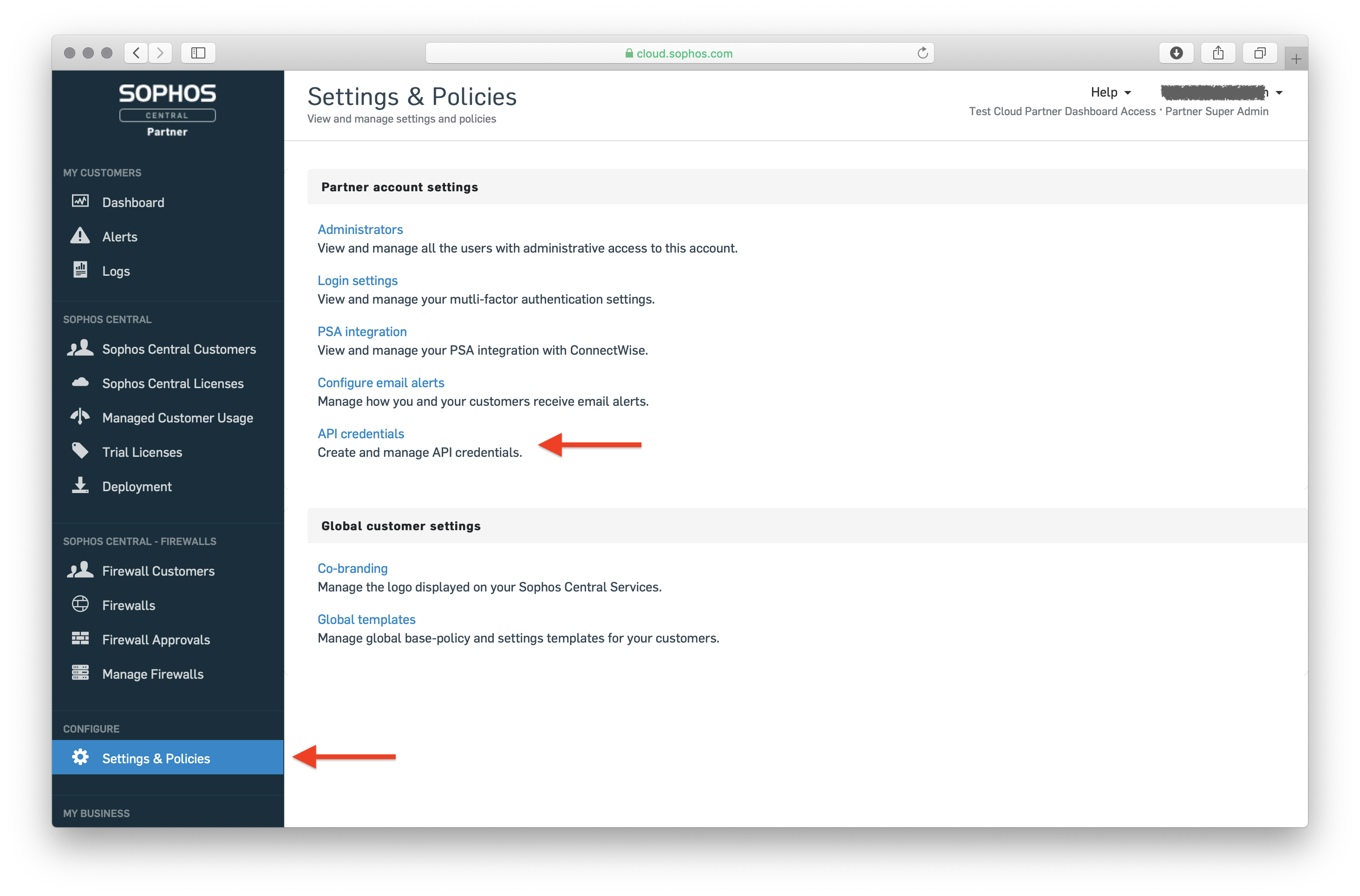
Click 'Settings & Policies' and then click the "API Credentials" link.
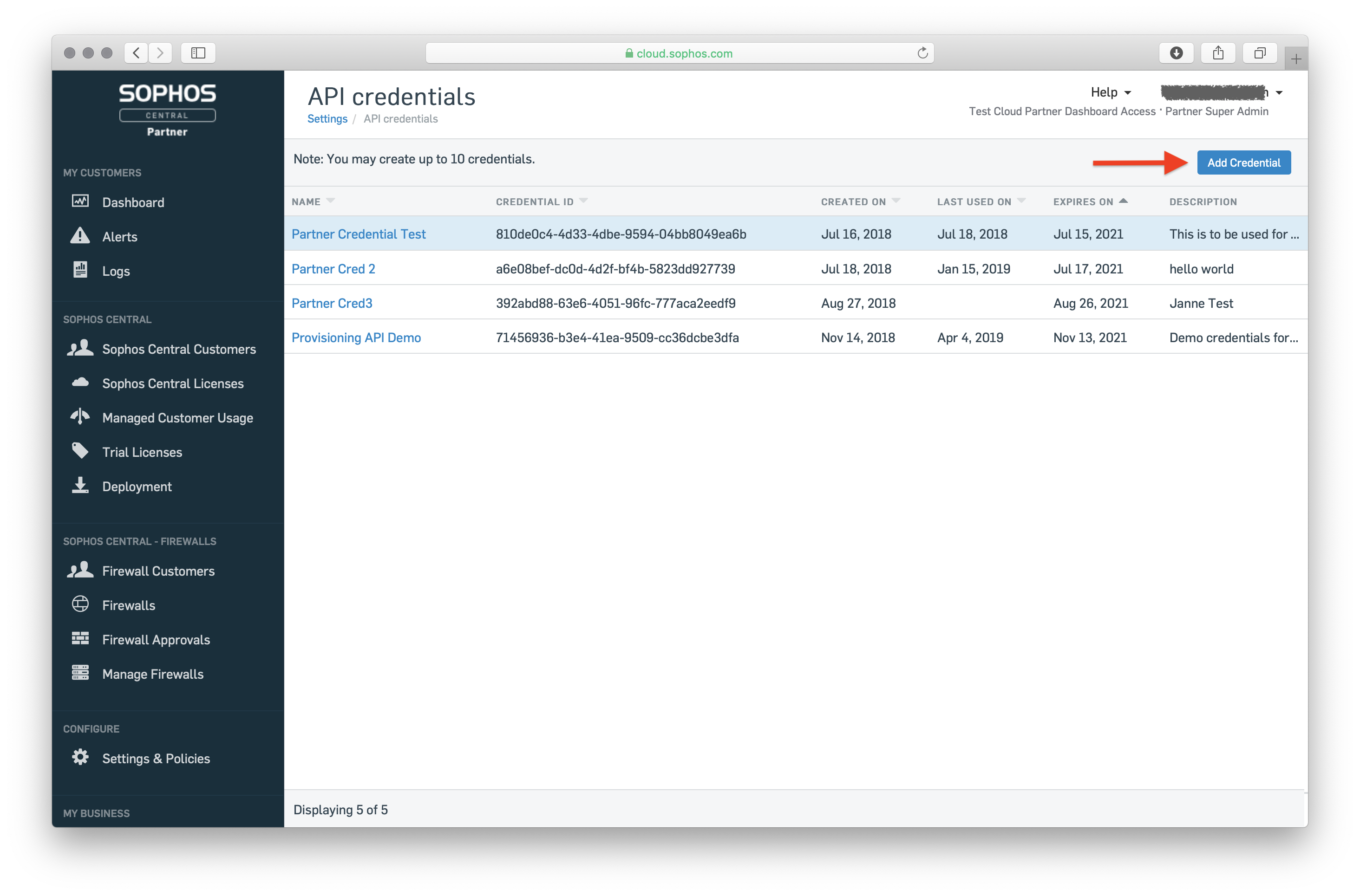
Step 1b - Add a new set of credentials
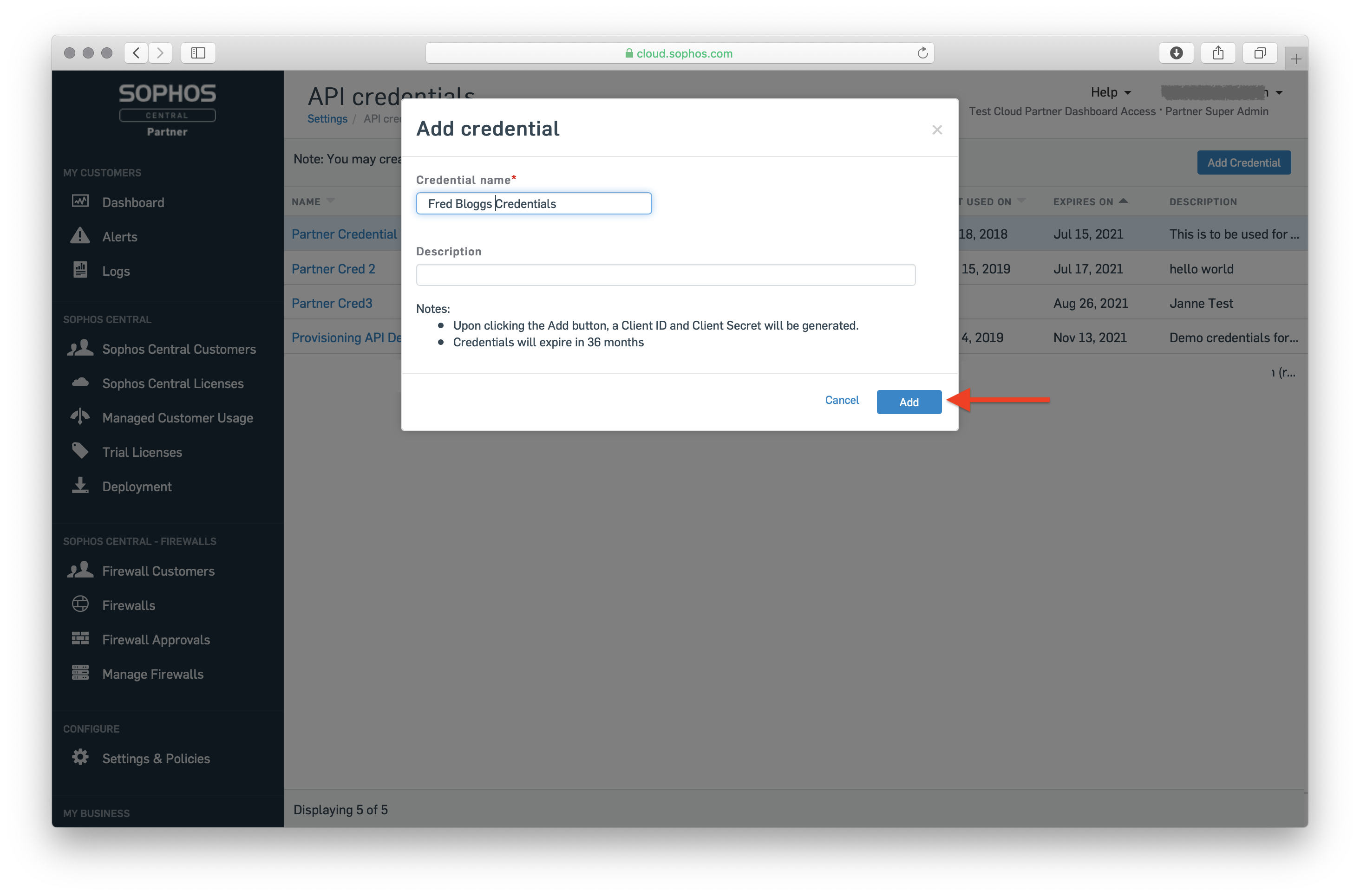
Supply a name for your credential set and a description, then click 'Add'.
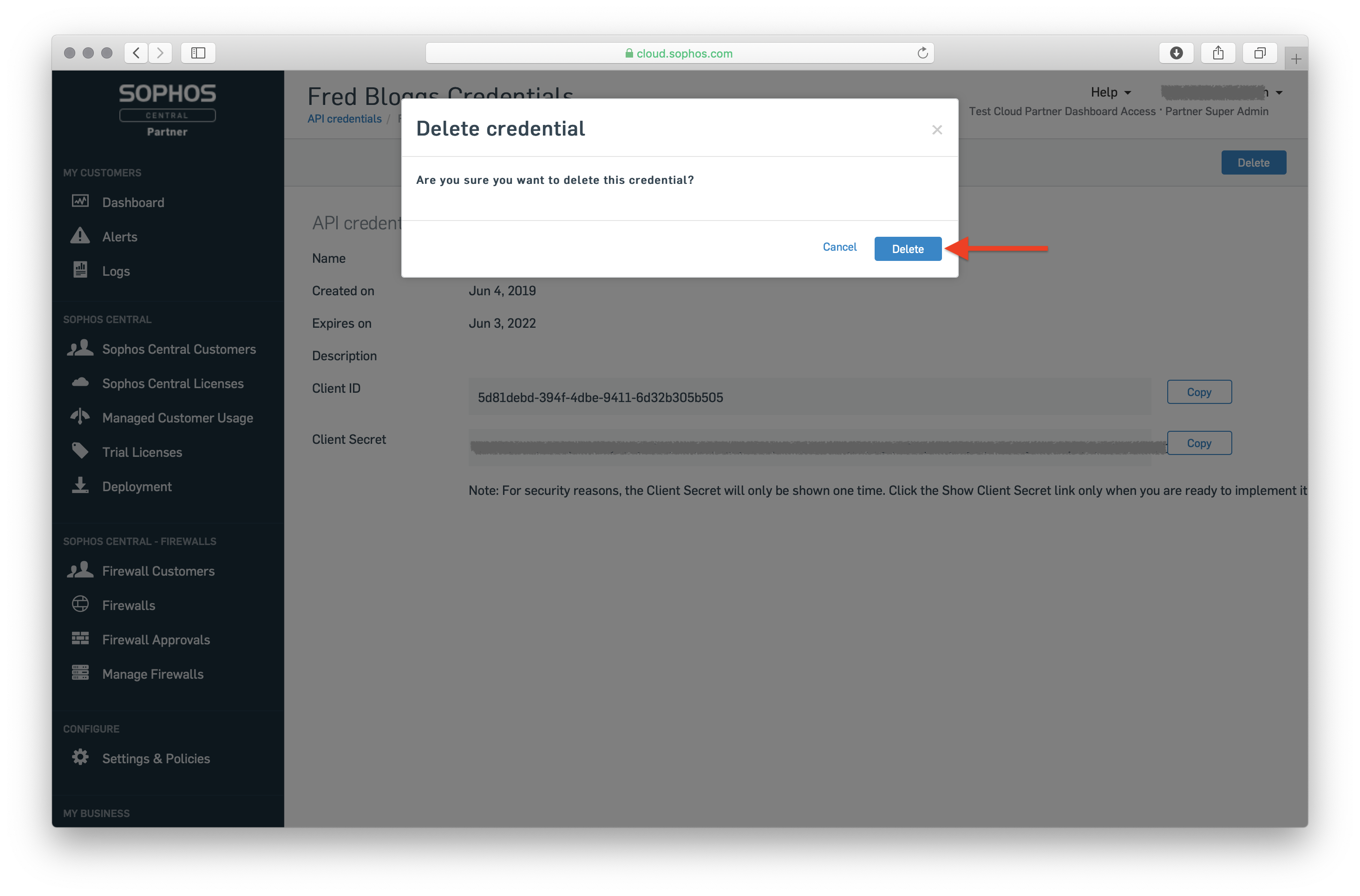
Note: To delete these credentials later, after you no longer need them, click on the entry in the credentials list to open the details view, then click 'Delete'. Next, click 'Delete' in the popup dialog to confirm deletion.
Step 1c - Grab your client ID and secret
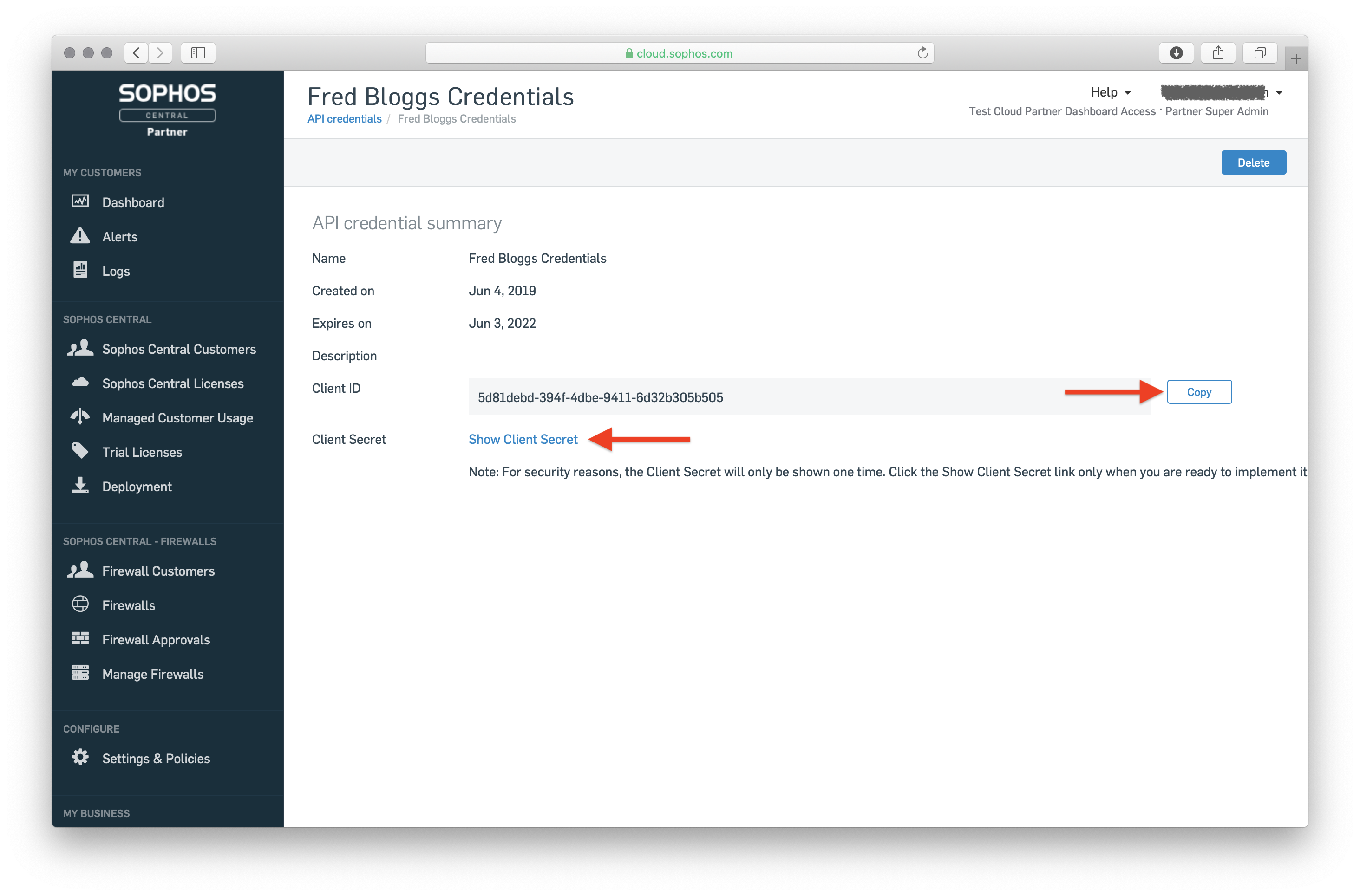
Click 'Copy' to note down the client ID. Also show the client secret.
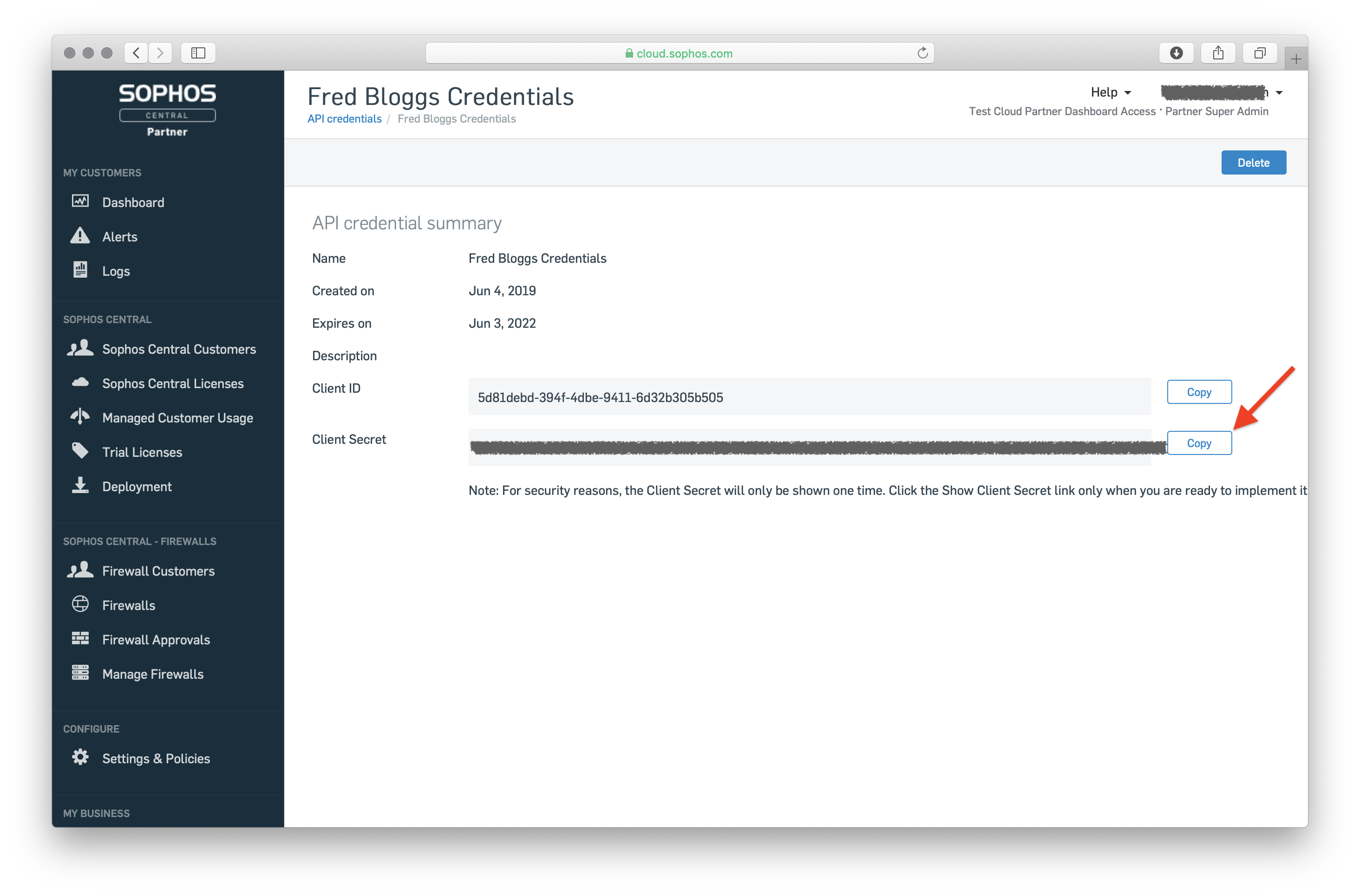
Click 'Copy' to note down the client secret.
⚠️ WARNING: It is your responsibility to store your client ID and secret securely. If these are lost or stolen, an attacker will be able to call APIs on your behalf and steal your data or cause damage.
Now you are ready to start calling APIs.
Step 2 - Authenticate
You can make API calls in the next few sections using cURL. Follow the instructions on cURL's website to install this tool.
Note: Some command lines in the examples below have been split over multiple lines for legibility. Remove the \ before running the commands. Also replace curl with curl.exe on Windows.
From a command line prompt, run the following command, replacing <client-id> with the client_id from the previous step, and <client-secret> with the client_secret from the previous step:
curl -XPOST -H "Content-Type:application/x-www-form-urlencoded" \
            -d "grant_type=client_credentials&client_id=<client-id>&client_secret=<client-secret>&scope=token" \
                   https://id.sophos.com/api/v2/oauth2/token
This command returns an API response like this:
{
  "access_token": "<jwt>",
  "errorCode": "success",
  "expires_in": 3600,
  "message": "OK",
  "refresh_token": "<token>",
  "token_type": "bearer",
  "trackingId": "<uuid>"
}
Note the <jwt> token in the call above as you will need to pass it as a header in every subsequent API call.
Step 3 - Find your Partner ID
After authenticating, you need to be able to discover the ID assigned to your business entity by Sophos:
curl -XGET -H "Authorization: Bearer <jwt>" https://api.central.sophos.com/whoami/v1
A successful response looks like this:
{
    "id": "D24C5DD6-804D-48D8-827C-C9300C24AE7F",
    "idType": "partner",
    "apiHosts": {
        "global": "https://api.central.sophos.com"
    }
}
Note the id in the response above. This is the "multi-tenancy" header that you need to pass in for all subsequent API calls (<partner-id> placeholder in the rest of this document).
Step 4 - List tenants
Next call the following API to find all the tenants you manage and the data region where their resources are located.
curl -XGET -H "Authorization: Bearer <jwt>" \
           -H "X-Partner-ID: <partner-id>" \
                https://api.central.sophos.com/partner/v1/tenants?pageTotal=true
A successful response (when you have over a 100 tenants) looks like this:
{
    "pages": {
        "current": 1,
        "size": 50,
        "total": 3,
        "maxSize": 100
    },
    "items": [
        {
            "id": "4F426605-CE10-41A7-8BC7-24B5E8F4C4BF",
            "name": "Acme Inc.",
            "dataGeography": "US",
            "dataRegion": "us01",
            "billingType": "term",
            "partner": {
                "id": "D24C5DD6-804D-48D8-827C-C9300C24AE7F"
            },
            "apiHost": "https://api-us01.central.sophos.com"
        },
        {
            "id": "0E21299E-0A9E-4DCA-A49D-5D5AFC4E83EB",
            "name": "Elmer Foods",
            "dataGeography": "US",
            "dataRegion": "us01",
            "billingType": "monthly",
            "partner": {
                "id": "D24C5DD6-804D-48D8-827C-C9300C24AE7F"
            },
            "apiHost": "https://api-us01.central.sophos.com"
        },
        {
            "id": "405C8E7D-DE17-4533-BA60-3D5E83742E79",
            "name": "Wile E. Traders",
            "dataGeography": "EU",
            "dataRegion": "eu02",
            "billingType": "monthly",
            "partner": {
                "id": "D24C5DD6-804D-48D8-827C-C9300C24AE7F"
            },
            "apiHost": "https://api-eu02.central.sophos.com"
        }
        // 47 other tenant objects ...
    ]
}
Note: Pages are numbered starting from 1 rather than 0.
If the "total" field in "pages" is greater than 1, you need to call the API as many times as needed to fetch all the pages.
Here is the API call to fetch page 2:
curl -XGET -H "Authorization: <jwt>" \
           -H "X-Partner-ID: <partner-id>" \
              https://api.central.sophos.com/partner/v1/tenants?page=2
... followed by the call to fetch page 3:
curl -XGET -H "Authorization: <jwt>" \
           -H "X-Partner-ID: <partner-id>" \
                 https://api.central.sophos.com/partner/v1/tenants?page=3
Note: Don't use the "pageTotal" query parameter for the second and subsequent pages as the total number of pages doesn't need to be recalculated when pages are being fetched by the client.
Collect the tenant id and apiHost values from the response above:
Example
4F426605-CE10-41A7-8BC7-24B5E8F4C4BF, https://api-us01.central.sophos.com
0E21299E-0A9E-4DCA-A49D-5D5AFC4E83EB, https://api-us01.central.sophos.com
405C8E7D-DE17-4533-BA60-3D5E83742E79, https://api-eu02.central.sophos.com

... (etc.)
Step 5 - Call tenant APIs
For each pair, construct the URL of the Tenant API you want to call, for example, to fetch all endpoints:
curl -XGET -H "Authorization: Bearer <jwt>" \
           -H "X-Tenant-ID: 4F426605-CE10-41A7-8BC7-24B5E8F4C4BF" \
                https://api-us01.central.sophos.com/endpoint/v1/endpoints

curl -XGET -H "Authorization: Bearer <jwt>" \
           -H "X-Tenant-ID: 0E21299E-0A9E-4DCA-A49D-5D5AFC4E83EB" \
                https://api-us01.central.sophos.com/endpoint/v1/endpoints

curl -XGET -H "Authorization: Bearer <jwt>" \
           -H "X-Tenant-ID: 405C8E7D-DE17-4533-BA60-3D5E83742E79" \
                https://api-eu02.central.sophos.com/endpoint/v1/endpoints

... (etc.)
In each case, you need to call the same API as many times as needed to fetch all endpoints for that tenant.
Each response looks like this:
{
    "pages": {
        "fromKey": "<from-key>",
        "nextKey": "<next-key>",
        "size": 12,
        "maxSize": 50
    },
    "items": [
        {
            "id": "D335E033-FA26-4B08-85E3-398A6B7FD67E",
            "type": "computer",
            "tenant": {
                "id": "4F426605-CE10-41A7-8BC7-24B5E8F4C4BF"
            },
            "groupId": "1715960E-4DEA-420D-8535-01C0F0FFA648",
            "groupName": "HR",
            "hostname": "Bob's MacBook",
            "health": {
                "overall": "good",
                "threats": {
                    "status": "good"
                },
                "services": {
                    "status": "good",
                    "serviceDetails": [
                        {
                            "name": "Sophos Anti-Virus",
                            "status": "running"
                        },
                        {
                            "name": "Sophos AutoUpdate",
                            "status": "running"
                        }
                        // Other services ...
                    ]
                }
            },
            "associatedPerson": {
                "name": "Bob Sponge",
                "viaLogin": "bobsponge"
            },
            "os": {
                "isServer": true,
                "platform": "macOS",
                "name": "Mojave",
                "majorVersion": 10,
                "minorVersion": 14,
                "build": 5
            },
            "ip4Addresses": [
                "192.168.2.55"
            ],
            "ip6Addresses": [
                "2001:0db8:85a3:0000:0000:8a2e:0370:7334"
            ],
            "macAddresses": [
                "00-14-22-01-23-45"
            ],
            "tamperProtectionEnabled": true
        },
        // 11 other endpoint objects
    ]
}
This API uses a "key based" pagination technique rather than using page numbers.
The <from-key> example value in the pages field in the response above is the key associated with the first item on the page.
The <next-key> example value in the pages field in the response is the key you should use to fetch the next page.
As an example, the second page of endpoints for the first tenant could be fetched as follows:
curl -XGET -H "Authorization: Bearer <jwt>" \
           -H "X-Tenant-ID: 4F426605-CE10-41A7-8BC7-24B5E8F4C4BF" \
                https://api-us01.central.sophos.com/endpoint/v1/endpoints?pageFromKey=<next-key>
The response from this API shows the value to use for pageFromKey to fetch the third page (if there is one). If the nextKey value is missing, you have reached the end of pages and can stop iterating.
Note how each endpoint object in the items array of the paged response indicates which tenant it belongs to. All the data for the different tenants can now be aggregated and either persisted or displayed to an end user.
Conclusion
You can now make simple API calls. There are some things you need to know about error handling, pagination, partial responses and other aspects of calling RESTful APIs that are specific to Sophos APIs. You can read about them here.